How to create an FTP account on cPanel
By default, you already have a single FTP account. Use your cPanel username and password to log in to it. Creating new FTP accounts can be done to give FTP access to other people without giving them your cPanel login credentials.
Click the FTP accounts icon.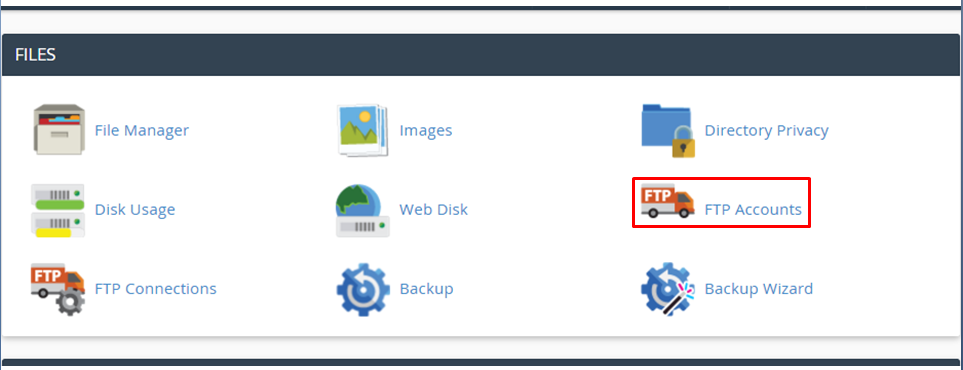
FTP Accounts allow you to access your website's files through a protocol called FTP. You will need a third-party FTP programme to access your files.
You can log into the FTP account by entering your username and password for the account you wish to log into.
A recommended directory will be automatically generated. You can change this directory whenever you'd like. The FTP account will be limited to the specified directory and any subdirectories.
You can also set a disk space quota for the account.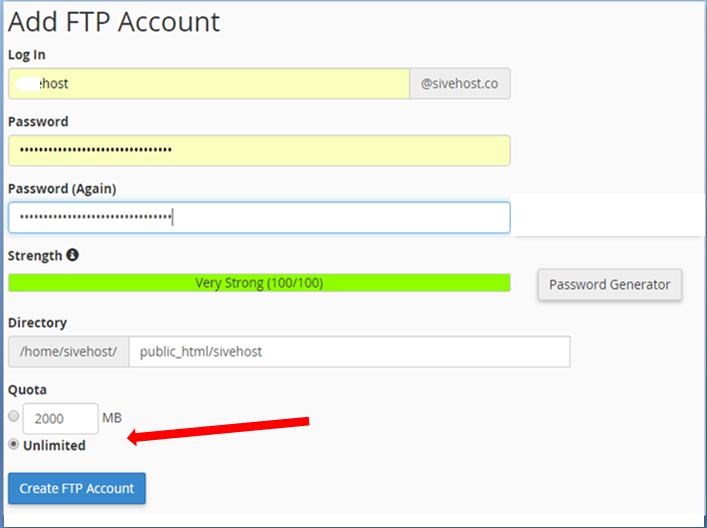
Then you click the Create FTP Account button.
That's all.
How to Create an FTP account طباعة
- 1128
هل كانت المقالة مفيدة ؟
مقالات مشابهة
How to Change the Password of the FTP Account in cPanel
To change the main root FTP account, you have to change the password of your cPanel account....
How to Change the FTP User Quota in cPanel
Follow these steps to change the FTP quota or set it to Unlimited.1. Log in to your cPanel...
How to Delete an FTP User Account From cPanel
If you want to delete an FTP account, you can accomplish it by following this tutorial.1. Log in...
How to Create an FTP Account in cPanel
You can access the FTP account using the cPanel login details, which gives you full access to the...